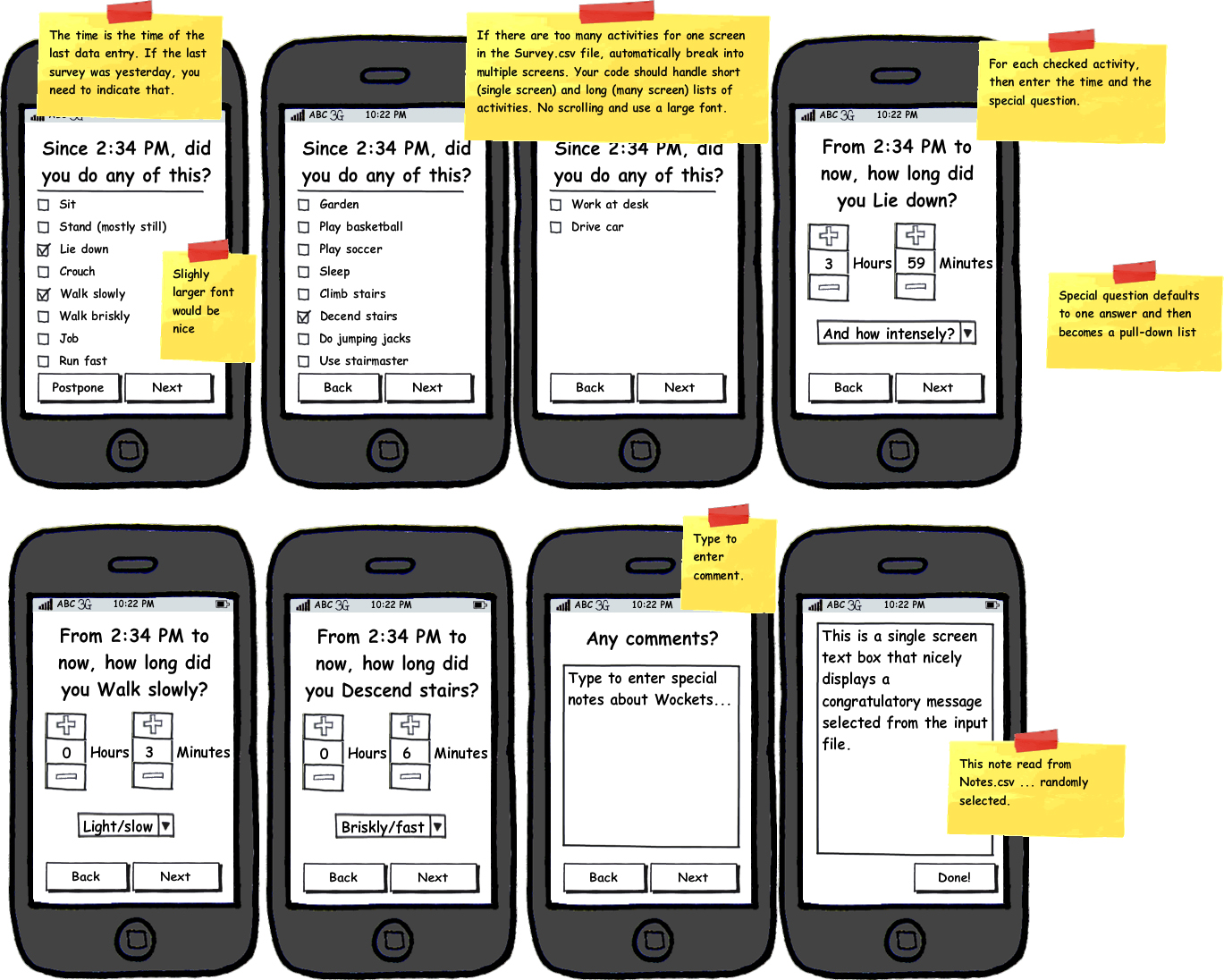
Wockets Physical Activity TrackerBackgroundThe Wockets system is designed to allow population-scale measurement of physical activity on mobile phones. More information about this project is available at http://web.mit.edu/wockets. We will be deploying the system with 50 people with California for 8 months. During that time, the subjects in the experiment will occasionally use their mobile phone to self-report how they are getting physical activity. Essentially, they will keep an activity diary marking down which activities they have performed and for how long and at what intensity. That record will be used to compare how well the automatic Wockets system can recognize the type, duration, and intensity of activity and sedentary behavior. ExerciseYour goal is to create an app on Windows Mobile 6.5 that can be used for this physical activity tracking. (Alternatively, you could do this project for Android phones, although the Wockets system has not been ported to Android quite yet). During specified times during the day, the app will beep the phone and pop to the foreground. It will then ask the user to enter what activities they have done since the last time they did an activity entry (specifying the time). All the information needed by the app, such as times to prompt and the activity list, will be loaded form comma-seperated files. The application takes three files as input. The first file indicates when the app should beep the phone (Timing.csv). The colums of the file are Name, MON, TUE, WED, THU, FRI, SAT, SUN, StartTime (24h), EndTime (24h). The Name column is just for convenience. The day-of-week columns indicate if that row's prompt time applies for a given day, where an 'x' indicates that it does. The StartTime is the earliest time when the prompt should occure. The EndTime is that last time when the prompt should occcur. The actual prompt should occur sometime randomly during the time (not always at the very start). For example, StartTime=14:00, EndTime=15:00 means the prompt should occur at a random time during 2-3PM. StartTime=14:00, EndTime=14:00 means the prompt should occur at exactly 2PM. The second file indicates notes that may appear after the data entry is finished. These are congratulatory messages that will fit on a single screen display (Notes.csv). There is a single column labeled Note. Each row has one congratulatory phrase. There might be many of these phrases and the app should pick one at random. The third file is the actual survey, with the physical activities to track (Survey.csv). The columns are Activity, FollowUpQuestion, Answer1, Answer2, Answer3, Answer4, ... (There could be as many Answer columns as needed). The Activity column contains the name of the actual physical or sedentary activity. The FollowUpQuestion column contains a question that shows up on the interface as the default value in a pull-down list, where all the possible answers are in the answers columns. There can be as many answers as needed. Study this image of showing the design: Design Image. Suppose someone gets a prompt and doesn't answer. 10 minutes later beep again. If still no answer, 10 minutes later beep again. If still no answer, then give up. The application should save data to an output file (example: Output.csv). Step 1:Read all the information above. If something is not clear, ask! (...@neu.edu). Step 2:Download all the Microsoft tools you need for Windows Mobile 6.5 development. We use Visual Studio 2008 with the Windows Mobile 6.5 developer's kit/APIs. Write the app using the emulator. Be sure that you thorougly test the ability of the app to read files with different lengths and information. Also make sure you test the timing of the prompting well. Step 3:Send your entire project with instructions on how to run it (...@neu.edu). If it runs well and all looks good, we'll setup a meeting to run the code on an actual phone! |