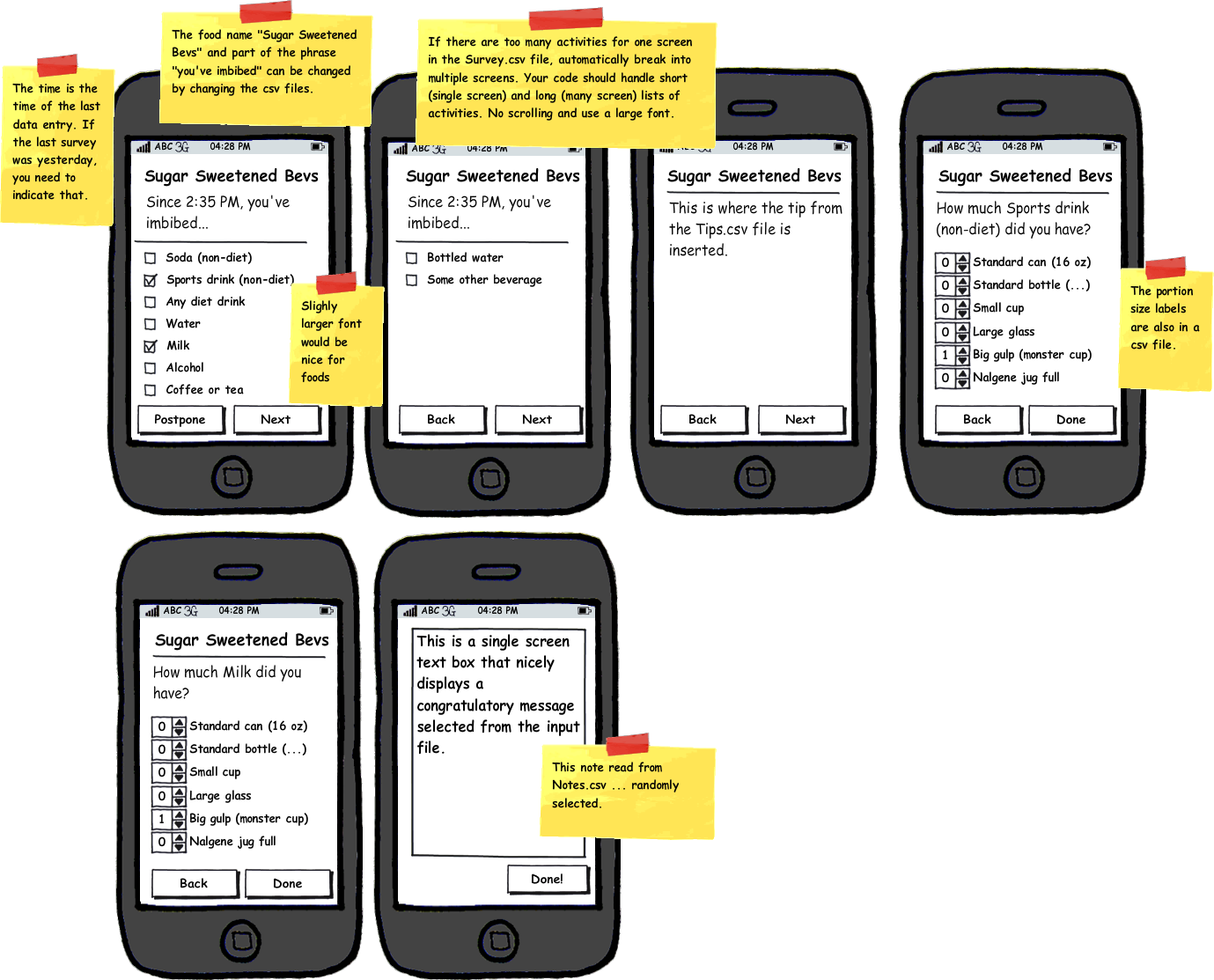
CITY Mid-Level Food TrackerBackgroundThe Cellphone Intervention for Young Adults (CITY) project is funded by the National Institutes of Health with the goal of developing a persuasive cell phone application to help 18-35 year olds lose weight and maintain weight loss. The phone application will provide continuous activity monitoring and provide a host of applications to engage participants and to help them keep them moving towards a healthier lifestyle. The software being designed and built now will be evaluated in a 2-year randomized clinical trial with 300 participants in the Durham, NC area. Results will be published in medical and engineering research journals. One of the strategies the app will use to encourage weight loss is to help people learn to track what they eat in a variety of ways. It will have several different types of food tracking ... some simple requiring a one-button click, and some time-consuming and tedious, requiring that everything someone has eaten be entered. ExerciseYour goal is to create a "mid-level" complexity food tracker for Android phones that can be used to track sugar-sweetened beverages, but also easily adapted to allow tracking of other food categories (e.g., dairy, salt, fruits, veggies, etc.) by simpling changing some text files that tell the GUI what to do. During specified times during the day, the app will beep or vibrate the phone and pop the food tracking app to the foreground. It will then ask the user to enter some information about food(s) eaten since the last time they did a food entry (indicated with the date/time). All the information needed by the app, such as times to prompt and the activity list, will be loaded form comma-seperated files. The application takes three files as input. The first file indicates when the app should beep the phone (Timing.csv). The colums of the file are Name, MON, TUE, WED, THU, FRI, SAT, SUN, StartTime (24h), EndTime (24h). The Name column is just for convenience. The day-of-week columns indicate if that row's prompt time applies for a given day, where an 'x' indicates that it does. The StartTime is the earliest time when the prompt should occure. The EndTime is that last time when the prompt should occcur. The actual prompt should occur sometime randomly during the time (not always at the very start). For example, StartTime=14:00, EndTime=15:00 means the prompt should occur at a random time during 2-3PM. StartTime=14:00, EndTime=14:00 means the prompt should occur at exactly 2PM. There could be an arbitrary number of these prompt times in the file. The second file indicates notes that may appear . These are congratulatory messages that will fit on a single screen display (Notes.csv). There is a single column labeled Note. Each row has one congratulatory phrase. There might be many of these phrases (hundreds) and the app should pick one at random. The third file is the actual survey, with the foods to track (Survey.csv). The first column is a header for certain types of information. Under each header in the first column, the second column contains the info to be displayed. There can be an arbitrary number of entries under each category, even though only a few are shown in the example. For instance, the Title of the app is randomly selected to be either "Sugar Sweetened Bevs" or "Sugary Bevs" each new time the app is prompted (the title should stay consistent throughought any given interaction). The "Eating phrase" can change to add a bit of unpredictability to the wording. The "Food category" are the main foods. There could be more than 1-2 screens worth and your code should account for that. Finally, the "Portions" options are listed. Here we can assume these will be limited to one screen, but your code should show an error when loading this file if too many portions are entered for the GUI (e.g., if the GUI can only display six, flag an error if more are in the csv file). Study this image of showing the design: Design Image. Suppose someone gets a prompt and doesn't answer. 10 minutes later beep again. If still no answer, 10 minutes later beep again. If still no answer, then give up. The application should save data to an output file (example: Output.csv). Step 1:Read all the information above. If something is not clear, ask! (...@neu.edu). Step 2:Download all the Android tools you need for development. We would recommend that you do the Android tutorials first:
Write the app using the emulator. Be sure that you thorougly test the ability of the app to read files with different lengths and information. Also make sure you test the timing of the prompting well. Step 3:Send your entire project with instructions on how to run it (...@neu.edu). If it runs well and all looks good, we'll setup a meeting to run the code on an actual phone! |